


World Clock - World time clock
3.922.00 Reviews
App Specs
- Version
- 1.2.4.4
- Updated On
- License
- Free
- Downloads
- 500,000+
- Developer
- Battery Stats Saver
- Categories
- Weather
- Platform
- Android
Screenshots
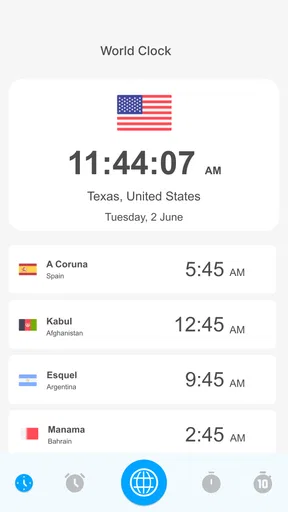
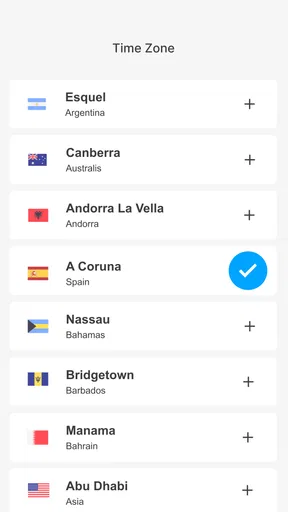
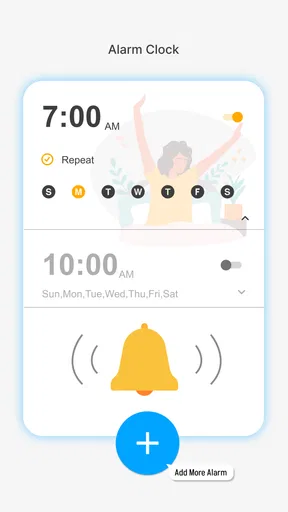
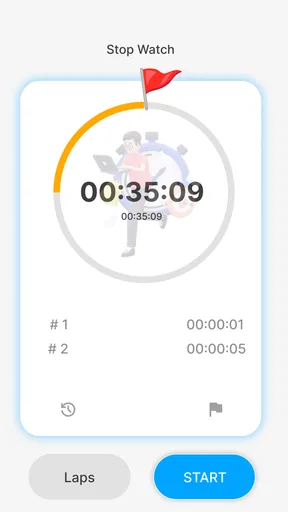
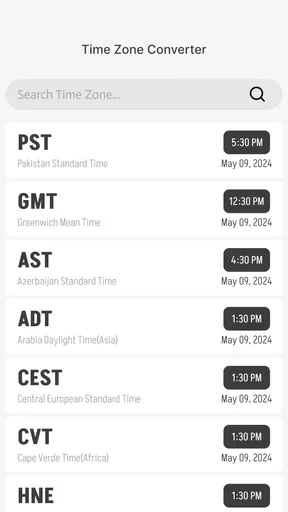
 Analysis by AppCompare
I use a world clock for a very practical reason: time zones are easy to misread when a message, meeting, or flight involves another country. World Clock - World time clock approaches that problem as a focused weather-category app built around checking the time around the globe. It is free to download, aimed at everyone, and its simple purpose makes it more useful than a crowded forecast app when all I need is a quick answer to “what time is it there?”
My overall impression is that this is a straightforward utility rather than an ambitious planning platform. The developer, Battery Stats Saver, presents it as a way to view global time zones and get a real-time clock. That narrow focus is important: I would recommend it to someone who wants a dedicated time-zone reference, but not automatically to someone searching for calendars, travel planning, alarms, or detailed weather information in one place.
How World Clock feels during everyday use
I find a dedicated time-zone clock most useful when it becomes part of a small, repeatable habit rather than another screen I keep open all day. In this section, I’ll focus on how to make a quick check lead to a clearer decision—especially when a date or meeting crosses midnight somewhere else—before turning to the simple checks that help avoid common mix-ups.
A quick answer instead of a full planning suite
The main strength of a dedicated world clock app is the reduction in mental effort. I do not have to open a calendar, search the web, or convert a time manually. The app’s purpose is immediately understandable, which helps when I am checking a different region between other tasks. That directness also makes it approachable for family members who may not want to learn a complicated interface.
The store summary focuses on seeing time zones across the globe and using a real-time clock. In practical terms, that sets a clear expectation: this is primarily a reference tool. I would open it before sending a work message overseas, arranging a call with relatives, or checking whether an evening event in another country is happening during my morning.
It is worth separating perceived speed from the number of options on screen. A small, focused utility can feel fast because it asks me to do less. World Clock - World time clock is better judged by how quickly I can reach the relevant time than by how many extra tools it includes. If I want a clean answer without navigating through unrelated forecasts, that focus works in its favor.
What I would use it for
My most realistic use case would be a remote conversation. Imagine I am in Europe and need to contact a colleague in North America. Instead of guessing from memory, I can check the other region first, choose a reasonable overlap, and avoid sending a message at an inconvenient hour. The same workflow applies to relatives abroad, online appointments, international customer support, and watching an event scheduled in another time zone.
Worth Reading Before You Choose

EA SPORTS FC Mobile 26 Is a Bigger Football Game, but It Takes Time

Flipboard Shows What News Apps Must Do Beyond the Feed

Switching to Android Auto Means Rethinking Your Driving Routine

Google Calendar Makes a Crowded Week Easier to Manage

Ludo King Makes the Most of the Minutes Between Plans

Baby Panda World Brings Quick Play to Modern Phones, but Its Game Library Feels Busy
A less obvious use is using the clock as a pause before committing to a date. When someone says “tomorrow afternoon,” the phrase has little value until I know whose local afternoon they mean. Checking the time first helps me ask a better follow-up question. This is a small habit, but it prevents the kind of confusion that ordinary clock apps often do not address well.
I also see value for students and casual travelers. A student following an overseas class or livestream can check the local time without opening a full travel service. A traveler can use it as a quick orientation tool while moving between regions. I would still pair it with an official itinerary or airline source for actual travel details, because a clock alone does not replace those services.
Speed expectations and moments of heavier use
For occasional checks, I expect the app to feel light simply because the task is narrow. I would not install it expecting a large dashboard or a deep list of planning controls. The useful test is whether the app gets out of the way: open it, identify the time zone, make a decision, and close it.
Heavier use would look different. Someone coordinating several international meetings may return to the app repeatedly, compare multiple regions, and keep it open while discussing schedules. In that situation, the value depends less on a single fast check and more on whether the displayed information remains easy to scan over time. A dedicated clock has an advantage over manual conversion, but it can still become tiring if the user is comparing many locations at once.
I would approach repeated checking with a simple workflow: decide which regions matter before opening the app, verify the time, then write the result into the calendar or message immediately. That keeps the app as a reference instead of turning it into a substitute for scheduling. It also reduces the chance of checking one time and later remembering it incorrectly.
Resource demands are difficult to judge from the app’s basic description alone, so I would not promise unusually low battery use or exceptional background behavior. My practical advice is modest: use it as an on-demand tool rather than assuming it needs to remain active all day. For a clock reference, there is rarely a good reason to keep any utility open longer than necessary.
Reliability matters more than visual extras
With a time-zone app, reliability is not just whether the screen opens. The information has to be clear enough that I do not mistake one region for another. Labels, local time, and the relationship between locations all matter. A visually attractive clock that makes comparison confusing would be less useful than a plain screen I can understand immediately.
I would also treat time-zone changes carefully. Local clocks can shift because of seasonal rules, and the difference between two places is not always constant throughout the year. That is one reason I prefer checking the destination or contact’s local time directly instead of relying on a fixed mental offset. The app is most helpful when it supports that habit rather than encouraging guesswork.
For important appointments, I would still confirm the final time in the calendar invitation or with the organizer. That is not a criticism unique to this app; it is sensible whenever a meeting crosses borders. World Clock - World time clock can help me understand the current relationship between locations, while a calendar remains the better place to preserve the agreed appointment.
Recovery is another practical consideration. If the app closes or I leave it during a busy day, I want to be able to return without having to reconstruct a complicated setup. A simple utility has an advantage here because the basic purpose is easy to remember. On the other hand, if I had been relying on a carefully arranged set of locations, I would check that arrangement again after an update or device change rather than assuming every preference carried over perfectly.
Device compatibility and realistic limitations
The app supports devices running Android 6.0 or later, which covers a broad range of Android phones and tablets. That makes it accessible to people who keep an older device for travel, family use, or a secondary work phone. Compatibility alone does not guarantee identical behavior on every model, though, so I would pay attention to how comfortably the interface fits on a small screen or an older handset.
Its current version is 1.2.4.4. I would keep the application updated through the normal store process, especially for a utility connected to time-zone information. An update can matter even when the visible purpose remains the same, because small fixes may affect stability, display behavior, or compatibility with newer versions of Android.
The age rating is Everyone, which matches the app’s ordinary purpose. I would feel comfortable recommending it to a broad audience, including someone who only needs an uncomplicated clock reference. The more important question is not age but expectations: a user looking for a full weather service may find the category label misleading, because the practical function described here is time-zone viewing rather than forecasting.
The app is free, although optional in-app purchases range from $0.99 to $99.99 per item. That wide range is something I would consider before paying for anything inside the app. I would first use the free experience for the exact task I care about and only consider an upgrade if it clearly removes a problem I encounter. A large possible purchase should never be treated as automatically necessary for a basic clock check.
Where it fits beside familiar alternatives
Most phones already include a clock application, and many calendar services can display another time zone. Those built-in options may be enough for a person who checks one overseas location once in a while. In that case, installing another app adds another icon and another place to look without necessarily solving a real problem.
This app makes more sense when I want the time-zone task separated from alarms, timers, and calendar events. That separation can be useful for someone who checks global times frequently but does not want to open a scheduling tool every time. It also offers a more direct starting point than a web search, where the answer may be surrounded by travel pages, advertisements, or unrelated results.
Dedicated travel and meeting tools are stronger when the user needs more than the current local time. They may be better for building itineraries, coordinating invitations, tracking departures, or planning across changing dates. I would choose one of those alternatives for a trip with several bookings. I would choose this app for the smaller question that comes before planning: “What time is it in that place right now?”
Weather-focused applications are also a different comparison. A weather app can be the right choice when I need temperature, rain, alerts, or forecasts for a destination. World Clock - World time clock is more suitable when weather is irrelevant and the only information I need is the clock. The category connection should not make me expect a complete forecast experience.
Three practical habits that make it more useful
First, I would use the app before writing the date in an international message. If I say “let’s talk Friday,” I can check whether Friday has already started for the other person and include a local time that removes ambiguity. This is more reliable than converting from my own clock after the message is drafted.
Second, I would check the destination time twice when a schedule is important: once while planning and again shortly before the event. That small routine accounts for the fact that time differences can change during the year. It also catches mistakes caused by confusing a city with a country or by reading a date without noticing that midnight has crossed into the next day.
Third, I would keep the app separate from the final record of an appointment. After checking the time, I would put the confirmed event into my calendar with the correct time-zone context. This creates a useful division of labor: the clock app answers the immediate question, while the calendar protects me from forgetting the decision later.
A fourth habit is to use a short list of genuinely relevant locations rather than trying to monitor the whole planet at once. If I regularly contact three regions, those are the places I need to compare. Adding every possible location would make the information harder to scan and reduce the benefit of a focused utility.
Who should install it, and who should skip it
I think this app is a good fit for people with recurring international contact, especially those who want a dedicated place to check local time without opening a broader service. It can also suit families with relatives overseas, students following events abroad, and travelers who need quick orientation between more detailed planning steps.
It is less compelling for someone who only needs one occasional conversion and already has a reliable built-in clock or calendar. I would also suggest skipping it if the main goal is weather forecasting, alarms, calendar coordination, or travel reservations. Those needs call for tools designed around those tasks, not a focused time-zone reference.
Users who are especially sensitive to optional purchases should examine the app’s free experience before making assumptions about paid additions. The free price is attractive for trying the basic function, but the presence of in-app purchases means I would not treat every visible option as essential. My approach would be to judge the app by the simple clock task first and ignore extras unless they solve a specific, recurring inconvenience.
My performance and stability verdict
World Clock - World time clock has a clear role: it gives me a direct way to think about time beyond my own region. Its perceived speed should come from that narrow purpose, while its usefulness during heavy use depends on how easily I can compare locations without losing track of the date. I would not choose it for a feature-rich planning workflow, but I would consider it a sensible companion for recurring international communication.
The app has an average rating of 3.9 from around one thousand ratings, and it has passed half a million installs. Those figures suggest that it has found a real audience, while also reminding me that it may not satisfy every type of user. I read that as a reason to match the app to the right job rather than expecting it to replace a calendar, travel service, and weather tool at once.
My final recommendation is cautious but positive. Try it if you want a free, accessible real-time global clock and your daily problem is avoiding time-zone mistakes. Use it as a quick reference, confirm important appointments elsewhere, and keep expectations focused on its central purpose. Its best quality is not doing everything; it is making one international-time question easier to answer.
Pros
- Shows current times across multiple cities at a glance.
- Useful for scheduling calls across different time zones.
- Simple interface makes checking time quick and convenient.
- Helps reduce confusion when traveling internationally.
- Supports planning around local day and night hours.
Cons
- Some features may require payment or contain advertisements.
- Time-zone data depends on regular updates for full accuracy.
- Too many saved locations can make the list harder to scan.
- May offer limited customization for clock appearance.
- Does not replace a full calendar for managing appointments.
FAQs for World Clock - World time clock
What is World Clock - World time clock used for?
World Clock - World time clock is designed to help you check the current time in cities and countries around the world. After adding locations, you can compare different time zones, plan international calls, follow travel schedules, and avoid confusing time differences. It is especially useful for travelers, remote workers, students, and anyone who regularly communicates with people abroad.
How do I add cities or time zones to the clock?
The app generally lets you search for a city, country, or time zone and add it to a personalized list. Once selected, each location appears with its local time, making comparisons quick and convenient. Depending on your device and app version, you may also be able to reorder, remove, or favorite locations so the time zones you use most are easier to access.
Does World Clock - World time clock automatically adjust for daylight saving time?
World Clock - World time clock is intended to display local times according to the selected location, including seasonal daylight-saving changes where they apply. This is important because the time difference between two cities may change during the year. However, accuracy can depend on the app’s time-zone database, your device settings, and whether the application is updated regularly.
Does the app require an internet connection to show the time?
A world clock can often display previously selected time zones without a continuous internet connection because the basic time calculation uses your device’s clock and stored time-zone information. Internet access may still be needed when searching for new locations, updating time-zone data, or using additional online features. For travel, it is sensible to open the app before going offline.
Is World Clock - World time clock free to download and use?
The availability of free features depends on the version offered for your Android or iOS device. Basic functions, such as checking times in selected locations, may be available without payment, while advertisements, premium tools, widgets, or advanced customization could require an in-app purchase or subscription. Review the store listing and payment details before downloading or upgrading.


